Current Position Display Does Not Appear
NAVIGATION: NAVIGATION SYSTEM: Current Position Display does not Appear
- Current Position Display does not Appear
INSPECTION PROCEDURE
PROCEDURE
1. CHECK NAVIGATION RECEIVER ASSEMBLY
(a) Display the "Information" screen and then select "Map Data".

(b) Check if a disc is inserted into the map disc slot.
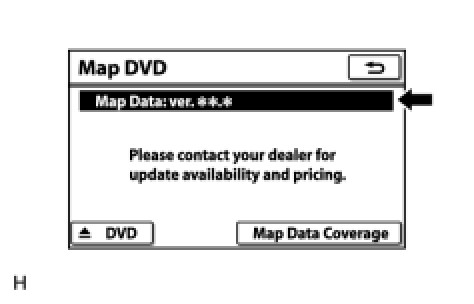
(1) Check if the map data version is displayed in the "Map Data" section.
OK:
The map data version is displayed.
NG -- INSERT MAP DISC IN MAP SIDE SLOT
OK -- Continue to next step.
2. CHECK MAP DISC
(a) Check that the map disc is not deformed or cracked.

OK:
No deformations or cracks on the map disc
NG -- REPLACE MAP DISC
OK -- PROCEED TO NEXT SUSPECTED AREA SHOWN IN PROBLEM SYMPTOMS TABLE Symptom Related Diagnostic Procedures